
Quick Answer: How Do You Request an Electronic Signature?
To request an electronic signature, prepare the final document and add your recipient’s name and email address to an electronic signature platform. Place signature fields where they need to sign and set a signing order if several people are involved. Then send the invitation and track the request until it’s complete. Exact steps and options vary by platform.
Introduction
Getting someone else to sign a document shouldn’t take a week of printing, scanning and chasing emails. Yet that’s exactly what happens when you send a file as an attachment and wait for it to come back signed.
An electronic signature platform organises the whole thing for you. You prepare the document, invite the right people and watch the request move to completion. In this guide you’ll learn how to request an e-signature step by step, how to handle multiple signers, how to follow up and what to do once everyone has signed.
Table of Contents
What Does It Mean to Request an Electronic Signature?
An electronic signature request is an invitation asking another person to review and electronically sign a document. As the sender, you prepare and send the document. The recipient gets an invitation or signing link, reviews the document and completes the action you asked for. Depending on the platform, you then receive the completed document once all required signing is done.
It helps to keep three tasks separate:
- Signing a document yourself: You are the signer. Our guide on how to sign a document online covers this side.
- Requesting another person’s signature: You are the sender, which is the focus of this article.
- Collecting signatures from multiple recipients: You manage several signers on the same document.
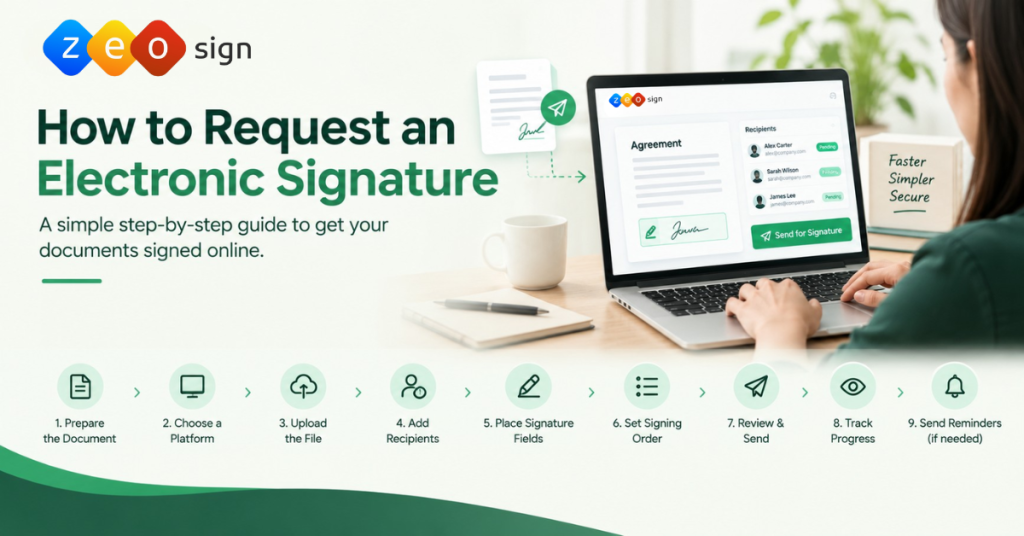
How to Request an Electronic Signature: Step-by-Step Process
Here is the full sender-side process from first draft to finished document.
Step 1. Prepare the Document for Signing: Start with the right file. Before you send a document for electronic signature, make sure the content is final. Check names, dates, amounts and key clauses. Work out who needs to sign and which pages need their signatures. Confirm the document is complete and easy to read.
Common mistake
Sending the wrong version is one of the most common problems. It confuses recipients and usually means cancelling the request and sending a new one.
Step 2. Choose an Electronic Signature Platform: A dedicated platform keeps your online document signing requests organised, especially when there are several signers or you send the same documents regularly. When comparing options, look at:
- Ease of use for both you and your recipients
- Support for multiple recipients
- Sequential signing options
- Request tracking
- Reusable templates
- Bulk sending, if you need it
- How documents are handled and stored
- Security and access controls
Not every platform offers all of these, so match the features to how you actually work.
Step 3. Upload or Import the Document: Select your document from wherever it’s stored and add it to the signing workflow. Preview it once it’s uploaded and double-check that you picked the correct version. Uploading is just the first part. Placing signature fields comes later.
Step 4. Add the Recipient’s Information: Enter each recipient’s name and email address. Check the spelling carefully because a wrong email address can delay the process or send your document to the wrong person.
If your platform supports roles, mark who needs to sign and who only needs a copy. When several people are involved, add every intended signer and confirm that each one has the right responsibility. This is how you invite someone to sign a document online without mix-ups.
Step 5. Place Signature Fields and Define Signing Requirements: Decide exactly where each person needs to sign. Assign every signature field to the correct recipient. Add date or information fields only where they’re needed and your platform supports them.
Tip
Scroll through the whole document to make sure no signature location has been missed. If anything might be unclear, add a short instruction so recipients know what to do.
Step 6. Set the Signing Order, If Necessary: Signing order controls the sequence in which recipients are asked to act. There are two common approaches:
- Sequential signing: Recipients sign one after another. Use it when one person must sign before the next.
- Parallel signing: Recipients sign independently in any order. Use it when no sequence is needed.
For example, an employee might sign an agreement first, followed by their manager. Keep in mind that signing order controls the workflow. It doesn’t by itself define who has legal authority to approve the document.
Step 7. Review and Send the Signature Request: Before you hit send, run through this quick checklist:
- Is this the correct, final version of the document?
- Are all recipient names and email addresses correct?
- Is every signature field assigned to the right person?
- Is the signing order set the way you want it?
- Have you added a short message explaining the document and what’s needed?
- Is there a deadline, and is it appropriate?
Once everything checks out, send the request.
Step 8. Track the Signature Request: After sending, keep an eye on progress. Where tracking is available you can see who has signed and which requests are still outstanding. Status labels differ between platforms, so learn what yours mean. Use this information to decide whether a follow-up is needed.
Step 9. Send Reminders and Follow Up: Give recipients reasonable time to review the document. If a request is still pending, send a polite reminder that names the document and explains how to find the invitation again. Some platforms offer automatic reminders, which can save you time where they’re available.
Step 10. Receive and Manage the Completed Document: Once all required signing actions are done, confirm the request is complete and access the signed document through your platform. Keep the completed version and any signing records that are available.
Legal note
A completed status doesn’t end your responsibility. Store the document according to your organisation’s storage, access and retention policies.
How to Request an Electronic Signature by Email
There are two ways to request an electronic signature by email:
- Ordinary email with an attachment: You send the file and ask the recipient to print, sign and return it. This is slow and hard to track.
- A request through an electronic signature platform: The platform emails the recipient an invitation with access to the signing workflow. This is the better option for most situations.
When you send a platform request, a short personal message helps. Here is an electronic signature request email template you can adapt:
Hi [Recipient Name],
Please review and electronically sign [document name] using the signing link provided.
If possible, please complete the signing process by [date].
If you have any questions or trouble accessing the document, just let me know.
Thank you, [Your Name]
Adjust the wording to fit your relationship with the recipient, the document type and how urgent it is.
How to Request Signatures From Multiple People
To request signatures from multiple people, add every required signer to the same request where your platform supports it. Assign each person the right signing responsibility. Then decide whether everyone can sign independently or whether the document needs a set order. Check all recipient details and field assignments before sending.
| Sequential signing | Parallel signing |
|---|---|
| Recipients act in a defined order | Recipients act independently |
| The next person is notified after the previous one finishes | Everyone is notified without waiting for others |
| Good for employee and manager workflows | Good when several people sign with no required sequence |
Example: An employment agreement may need the employee to sign first and an authorised representative to countersign afterwards.
Platforms vary in the routing options they support, so check what yours offers before you set up a complex workflow. This is the core of knowing how to collect electronic signatures smoothly.
How to Track an Electronic Signature Request
Tracking shows you which signature requests are still outstanding. Most platforms indicate whether a request is awaiting action or completed, which helps you spot who still needs to sign.
Good to know
Keep in mind that a simple request status is not the same as a detailed activity history or audit record. How much detail you get depends on the platform.
How to Remind Someone to Sign a Document
If a request sits unsigned, a friendly nudge usually does the trick. Wait a reasonable amount of time first. Mention the document by name, keep the tone polite and include the signing link or instructions again. Avoid sending reminders too often since that can frustrate people.
Here is a reminder you can use:
Hi [Name],
Just a quick reminder that your electronic signature is still needed on [document name].
Please use the signing link to review and complete it when convenient. Let me know if you need the invitation resent or have any trouble accessing it.
Thank you!
Common Mistakes to Avoid When Requesting Electronic Signatures
| Mistake | How to avoid it |
|---|---|
| Sending the wrong document version | Confirm the content is final before sending |
| Entering an incorrect email address | Check every recipient’s contact details |
| Missing signature fields | Review all required signing locations |
| Assigning fields to the wrong person | Double-check recipient and field assignments |
| Choosing the wrong signing order | Confirm whether the workflow is sequential or parallel |
| Giving unclear instructions | Explain exactly what the recipient needs to do |
| Ignoring pending requests | Monitor status and follow up appropriately |
| Neglecting document storage | Keep the completed version according to your policy |
How ZeoSign Helps Manage Electronic Signature Requests
ZeoSign is built around the sender’s workflow. Here is how its capabilities match common signature request needs:
| What you need | ZeoSign capability |
|---|---|
| Send a document to another person | Send documents for signing |
| Collect signatures from several people | Multiple-recipient support |
| Send documents to many recipients at once | Bulk Send |
| Have recipients sign in a set sequence | In-order Signing |
| Monitor request progress | Real-time tracking |
| Reuse documents you send often | Reusable templates |
| Capture video evidence of consent | Video Sign |
| Keep files in your own connected storage | Zero Custody Storage |
With Zero Custody Storage your files stay in your connected drive rather than being stored on ZeoSign’s servers. If you send documents for signature regularly, explore ZeoSign’s electronic signature workflow or request a demo to see how it fits your process.
Frequently Asked Questions
How do I request an electronic signature from someone? Prepare the final document, add the recipient’s details, assign the signature field, review everything and send the request through an electronic signature platform.
How do I request an electronic signature by email? Use an electronic signature platform to send the request. It emails the recipient an invitation with a signing link, which is easier to track than an ordinary email attachment.
Can I request electronic signatures from multiple people at once? Yes, if your platform supports it. You can add several recipients to one request and set them to sign in sequence or in parallel.
What is the difference between sequential and parallel signing? Sequential signing follows a defined order. Parallel signing lets recipients sign independently without waiting for each other.
How can I track whether someone has signed a document? Check the request status in your electronic signature platform. The level of detail shown varies between providers.
What happens after everyone signs an electronic document? You’re usually notified that the request is complete and can access the signed version. Store it according to your organisation’s retention policy.
Conclusion: Make Electronic Signature Requests Easier to Manage
Requesting an electronic signature comes down to a few habits: prepare the correct document, add the right recipients, assign fields and signing order, then send, track and follow up. Keep the completed document safe once everyone has signed. If you want a tool that supports this whole process, take a look at ZeoSign.